Replace, Skip or Rename Textures

- Edited
Good afternoon,
There is one issue that significantly affects the usability of Connector for asset libraries.
When adding assets to a library, it is very common for different models to contain textures with identical file names. Previously, the export process would simply fail in such cases. Now there are two available options: Overwrite or Skip.
The problem is that neither option is truly safe:
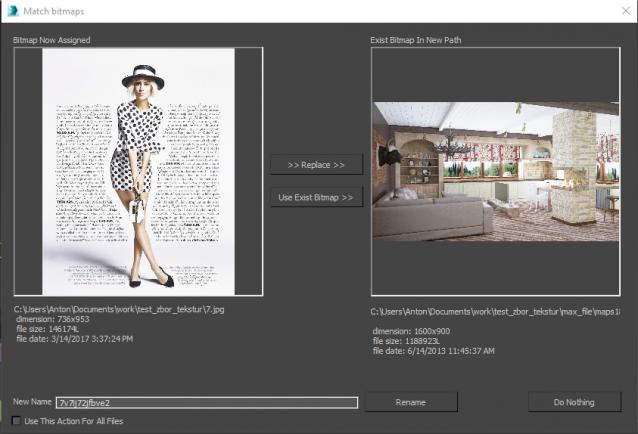
- In many cases, I have no way of knowing which texture should replace which, because the dialog does not display the actual textures. Manually searching for and comparing them is extremely inconvenient.
- Overwrite is risky because it can unintentionally break existing assets in the library, with no straightforward way to restore the original files.
- Skip is not a proper solution either, because the newly added asset may end up referencing the wrong texture or become incomplete.
A third option is needed: Rename.
Textures that share the same filename are often completely different files, and both versions need to be preserved. Ideally, Connector should automatically generate a unique suffix and rename the incoming texture so that:
- the filename remains recognizable,
- the new filename is guaranteed to be unique,
- the user does not have to manually rename files one by one.
In addition, before deciding whether to overwrite, skip, or rename, users should be able to compare both textures directly within the conflict dialog. The dialog should display:
- texture previews,
- resolution,
- file size.
In many cases, textures are visually similar or even identical but differ in quality, such as 1K, 2K, or 4K versions. Without this information, it is impossible to make an informed decision.
I believe that improving the texture conflict workflow would make Connector significantly more reliable and efficient for managing large asset libraries.
Comments
0 comments
Please sign in to leave a comment.